Crop to exact ID ratios, align the face, change background and export a 4×6 in print sheet tiled with cut guides — 300 DPI. 100% browser-side — your photo never leaves your device.
🪪
🪪
Why choose TaoClip ID Photo Maker?
🔒
Runs on your device
Cropping, cut-out, alignment and export all stay local — only the two optional AI buttons send anything.
📏
All standard sizes
US/visa 2×2 in, passport 35×45mm, 3×4, 4×6, 2×3 cm, or any size in mm.
🎯
Auto face alignment
Measures the crown and face width, then frames it to ICAO practice — one click.
🪄
AI background removal
Cut out the old background right here, then pick white / blue / red.
🖨️
4R, 5R and A4 sheets
Tiled copies with cut guides — JPG for the lab, PDF to print at home.
✨
300 / 600 DPI
Print-ready resolution, no watermark, no signup.
What is it for?
Documents: ID cards, passports, driver’s licenses, job and school applications.
Visa & study abroad: many countries require specific sizes like 35×45mm or US 2×2 inch.
Cheap bulk printing: export a 4×6 in sheet and print 4R at any photo lab for pennies per copy.
Save time: no studio visit — use an existing portrait and just frame it.
ID photo size chart
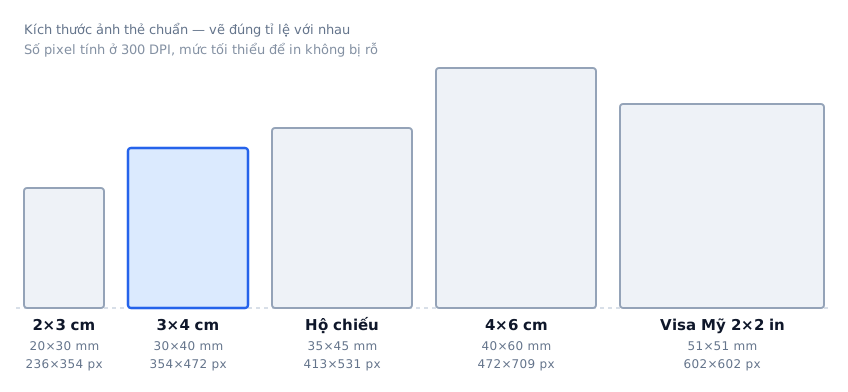
ID photo sizes are defined in millimetres; the pixel count depends on print resolution. The table below
converts each size at 300 DPI, the minimum for a print that does not look pixelated. At
600 DPI, double the pixel figures.
The five most common ID photo sizes, drawn to scale against each other.
Size
Millimetres
Pixels @300 DPI
Commonly used for
2×2 in (US)
51 × 51 mm
602 × 602 px
US passports and visas, USCIS forms, Indian visas
35×45 mm
35 × 45 mm
413 × 531 px
UK, Australia, Schengen, India, Japan, Korea — the most widely used size
3×4 cm
30 × 40 mm
354 × 472 px
Vietnam and parts of Asia: job applications, exams, student cards
4×6 cm
40 × 60 mm
472 × 709 px
Vietnamese passports and notarised paperwork
2×3 cm
20 × 30 mm
236 × 354 px
Small staff cards and school records
1 inch (China)
25 × 35 mm
295 × 413 px
Chinese documents and study applications
2 inch (China)
35 × 49 mm
413 × 579 px
Chinese passports and certificates
Requirements change over time and vary by authority. For anything important, check the guidance published by
the office or embassy handling your application before printing.
Front-facing, well lit: clear face, no tilt, plain background works best.
Center the face: tap “Auto-align face”, or drag directly on the photo to adjust by hand.
Proper background: tap “AI remove background”, then pick white/blue per the requirements.
Use 300 DPI or higher: ensures a crisp, grain-free print.
How to make an ID photo online — 4 steps
Add a portrait: drag and drop or click to select a clear, front-facing JPG or PNG.
Pick a size: 3×4, 4×6, 2×3 cm, passport 35×45mm, US 2×2 inch or a custom size in mm.
Remove background & align: tap “AI remove background” then “Auto-align face”, pick a background color — or drag on the photo to adjust by hand.
Download: one ID photo, or a full 4×6 in / 5×7 in / A4 sheet with cut guides — JPG for the lab, PDF to print at home.
The tool runs directly in your browser using Canvas, so your portrait is never uploaded — the background
removal model runs on your own device too. If your source photo is on the small side, the tool tells you
the real print resolution up front so you know whether it will look pixelated. Completely free, no watermark.
Frequently asked questions
Which size should I pick?
It depends on the document: US passport/visa is 2×2 inch (51×51mm), most international passports are 35×45mm, and 3×4 / 4×6 cm are common in many countries. Pick the preset and the tool crops your photo to that ratio.
Is the output sharp enough to print?
Yes. Photos export at 300 DPI (choose 600 DPI if needed), the standard for ID prints. The sharper and more front-facing your source photo, the better the result.
What is the 4×6 in print sheet?
It is the common 4R (10×15 cm) photo size available at any lab. The tool arranges multiple copies of your ID photo on one sheet with cut guides — just print 4R and cut them apart.
Can I change the background color?
Yes. Tap “AI remove background” inside the tool to cut the person out of the old background, then pick white, blue or red as your document requires. The AI model runs in your browser, so the photo still never leaves your device.
How does auto face alignment work?
After removing the background, tap “Auto-align face”: the tool measures the top of the head and the face width, then sets zoom and position so the head fills about 72% of the photo height with roughly 9% headroom above the crown — in line with international passport (ICAO) practice. You can still drag the photo to fine-tune.
Can I print at home?
Yes. Choose the A4 sheet and tap “PDF” — you get a true A4 PDF tiled with multiple copies and cut guides that any home printer can handle. For lab printing pick 4×6 in (10×15 cm) or 5×7 in (13×18 cm).
Are my images uploaded anywhere?
By default, no: cropping, background removal, face alignment and export all run locally in your browser via Canvas, and your portrait never leaves your device. The one exception is the optional “AI sharpen” and “AI fix lighting” buttons — only when you press one and confirm is the photo sent to our server and forwarded to Google Vertex AI, then deleted from the server. Skip those buttons and nothing is ever uploaded.
Is it free and watermark-free?
Yes. Completely free, no signup, and no watermark added to your ID photo.